
Website Score
Three questions matter most for your website: Is it up right now? Is it safe for visitors? Is it fast enough that Google rewards it? This score answers all three.
In your app: /website-score/
Every time a customer clicks through to your website, your site has about three seconds to load before they leave. If your site is down, has an expired security warning, or loads slowly on a phone, you lose that customer - and Google notices too. The Website Score monitors your site and grades it across three areas: whether it's online, whether it's secure, and how fast it loads.
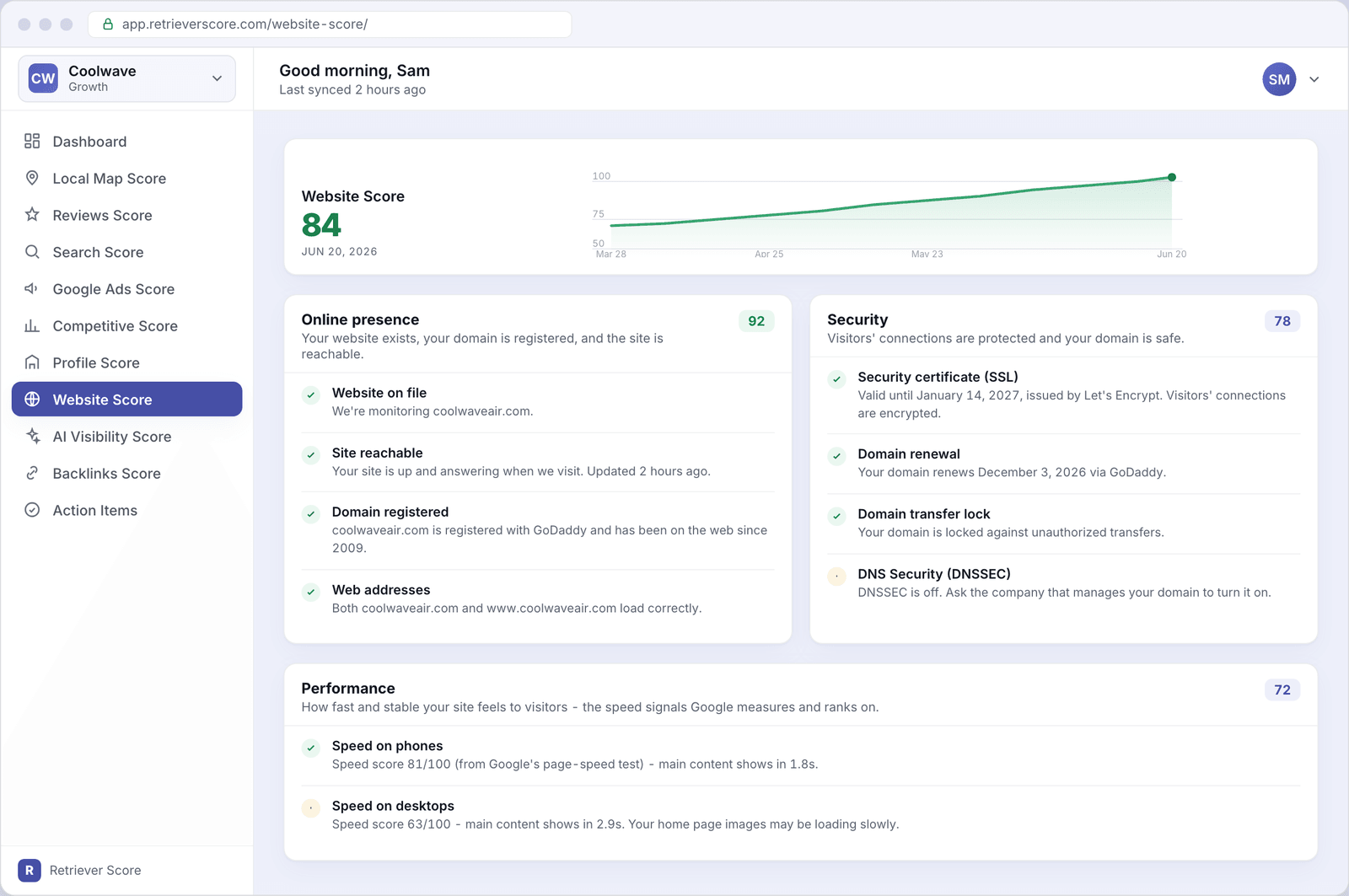
What's on this screen
The screen has four sections. Here's what each one tells you.
Score timeline
The large number at the top is your Website Score - a 0-to-100 grade across all three areas we watch. The line chart shows how the score has moved over the past 12 weeks. The color follows the system used everywhere in Retriever Score: green (80-100) is strong, blue (60-79) is good, gold (40-59) is fair, and red (below 40) needs attention.
Online presence
This section answers the most basic question: can people actually find and reach your website? It checks four things:
- Website on file - we have your address and are monitoring it.
- Site reachable - when we visit your site, it actually loads. If this turns red, your site is down and customers can't reach you.
- Domain registered - your web address is registered and owned. If your domain ever expires, your whole site disappears.
- Web addresses - both the "www" and non-"www" versions of your address work. Some older sites only have one working and visitors who type the other hit an error.
A score badge on the right of the section header shows this area's contribution to your overall Website Score. Green is great; gold or red means something needs fixing.
Security
This section checks whether your site is safe for visitors and safe from tampering. It looks at four things:
- Security certificate (SSL) - the padlock in your visitors' browser that encrypts the connection. If this expires, browsers show a "Not Secure" warning that scares customers away.
- Domain renewal - when your web address comes up for renewal. If you miss it, your site goes offline. Most registrars offer auto-renew - make sure it's turned on.
- Domain transfer lock - a setting that prevents anyone else from moving your domain without your approval. Think of it as a lock on the deed to your web address.
- DNS Security (DNSSEC) - a technical setting that makes it much harder for attackers to redirect your web address to a fake site. If this shows as off, ask the company that manages your domain to enable it.
Performance
This section shows how fast your site loads on phones and on desktop computers. Speed matters because Google's ranking formula uses page speed as a signal - a slow site ranks lower than a fast one, all else being equal.
- Speed on phones - your score from Google's own page-speed test (0-100), plus how long your main content takes to appear on a phone. Under 2.5 seconds is considered good.
- Speed on desktops - the same test on a desktop computer. Desktop speeds are usually faster than phone speeds, but both matter.
If your phone speed is low, the most common culprit is large images. Your web developer or hosting company can usually run an image-compression pass that brings the score up quickly.
Is my site actually down right now?
Check the "Site reachable" row in the Online Presence section. If it's green, your site is up. If it's red, we couldn't reach your site on our last check - visit your site in a browser to confirm, then contact your hosting company if it's really down.
The synced timestamp in the top bar of the app ("Last synced X hours ago") tells you when we last checked. Checks happen multiple times per day.
Set a calendar reminder for your domain and SSL certificate renewal dates. These are shown in the Security section. Most renew automatically, but if auto-renew ever fails you could lose your web address or get a security warning - both drive customers away fast. A two-month lead time gives you plenty of time to fix any payment issues.
What to watch over time
- The Security section turning from green to gold or red - usually means an SSL certificate or domain renewal is coming up soon. Act before the deadline.
- Phone speed staying low - a consistently low phone speed score is hurting both your visitors' experience and your Google ranking. Ask your web developer to look at image sizes and caching.
If Retriever Score doesn't have a website on file for you yet, the Website Score will show a "No website on file" notice. You can add your website address in Business settings and we'll start monitoring it right away.