
Creating Your Account
Set up your workspace in about two minutes. You start with your email and your business website - that's all we need to begin building your scores.
In your app: /signup/
Creating your Retriever Score account takes two short steps: fill in a form with your name, email, website, and ZIP code, then confirm your email with a 6-digit code. Once you confirm, we start pulling data from across the Internet to build your nine scores. The whole setup usually takes under five minutes.
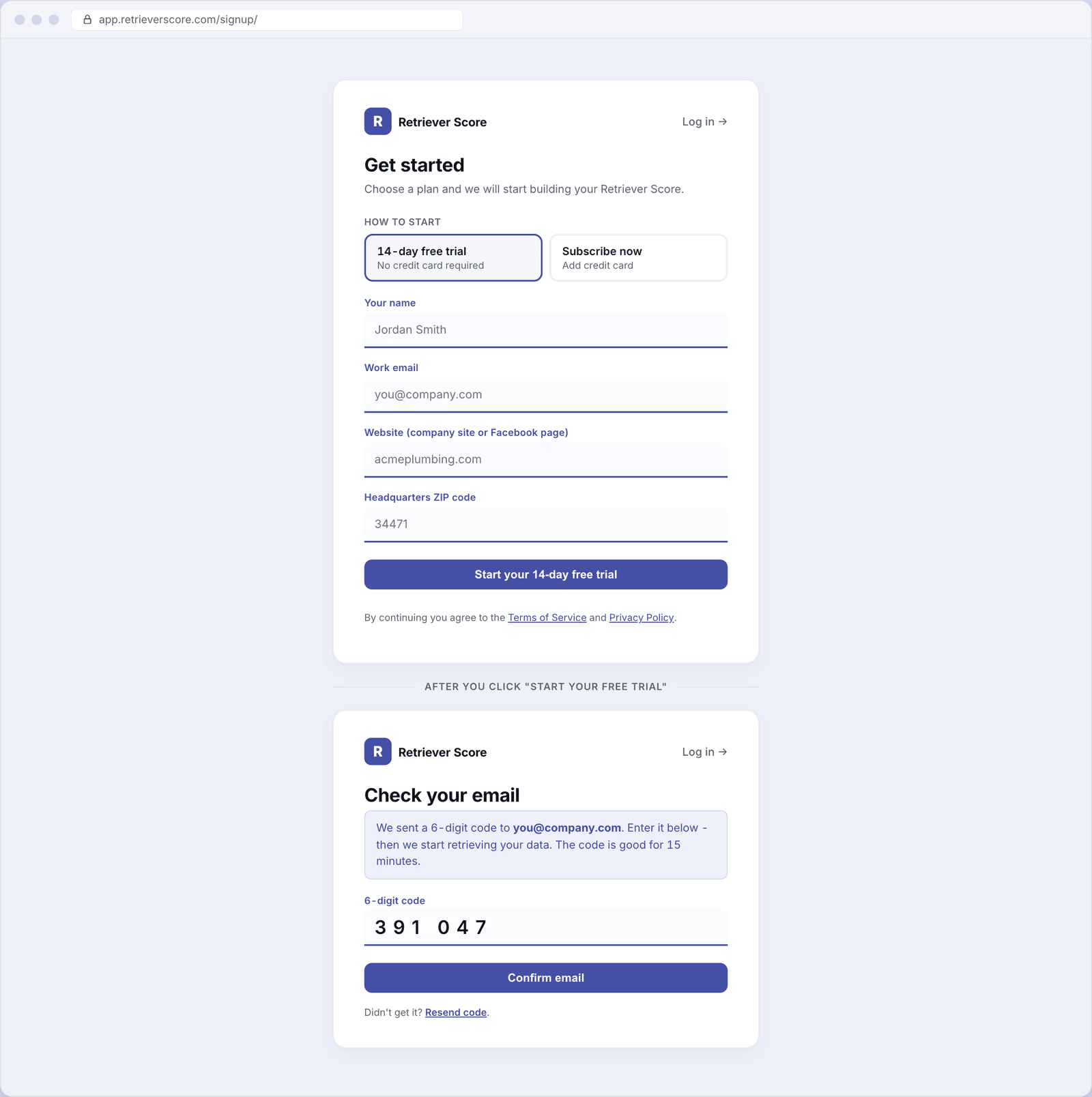
What's on this screen
The sign-up screen has two steps. You move from Step 1 to Step 2 automatically after you submit the form.
Step 1 - Fill in your details
How to start. At the top of the form you choose between a 14-day free trial (no credit card required) or Subscribe now (pay right away with a card). Most people start with the free trial. You can switch to a paid plan any time during or after the trial from the Plan & Billing screen.
If you choose Subscribe now, the form expands to show a plan picker (Core, Growth, or Pro), a location count, and a billing cycle toggle (monthly or annual - annual saves you two months' worth of fees).
Your name. How we greet you in the app and in your weekly email updates. You can change this any time from Your profile.
Work email. The address we send your sign-in codes and score updates to. This becomes your sign-in email - make sure it is one you check regularly and have access to right now (you will need to confirm it in Step 2).
Website (company site or Facebook page). Your business website URL or Facebook Business page. We use this to find and verify your business online so your scores track the right listing. If you have both, the website is preferred - but a Facebook page works fine if that is all you have.
Headquarters ZIP code. The 5-digit ZIP code of your main business location. This anchors your local market data - your map pack rankings, review searches, and competitor comparisons are all centered here. You can add more locations later on the Locations screen.
Once all four fields are filled in, click Start your 14-day free trial (or Continue to payment if you chose to subscribe now). We send a confirmation code to your email and move you to Step 2.
Step 2 - Confirm your email
Open the email from Retriever Score - it arrives within a few seconds. It contains a 6-digit code (and a one-click confirm link if you prefer not to type). Enter the code in the box and click Confirm email.
The code is good for 15 minutes. If it expires, click Resend code and a fresh one will land in your inbox. You can resend once per minute.
Once you confirm, your account is created and we start retrieving your data. Scores begin appearing in your dashboard within a day as our systems gather your reviews, rankings, competitor data, and more.
Choosing a plan at sign-up
If you start with the free trial, you will be on a Core-equivalent plan for 14 days with no card required. After the trial ends, your scores stop refreshing until you pick a paid plan. You can upgrade any time from Plan & Billing.
If you want to skip the trial and subscribe right away, choose Subscribe now at the top of the form. The plan picker appears and you can choose Core ($99/month), Growth ($149/month), or Pro ($199/month). Annual billing is available and saves you two months compared to paying month by month.
Already have an account?
If you have already signed up, you can sign in here. See Signing in for a walkthrough of the one-time code process.
Check your spam folder if the code doesn't arrive. The email comes from Retriever Score and has "confirm" or "sign-in code" in the subject. Some inboxes drop the first message from a new sender into spam. Adding our sending address to your contacts makes sure future codes land in your main inbox.