
Search Score
Your Search Score measures how well your website ranks in Google's regular search results - not the map pack, but the blue-link results below it - across the search terms your customers use most.
In your app: /search-score/
When someone searches for a service you offer and scrolls past the map pack, they see a list of websites ranked by Google. Your Search Score tells you how well your website performs in those results - which search terms you rank for, how high up you appear, and whether you are moving up or slipping down. Unlike the Local Map Score (which tracks the three-business map pack), this score is about your website's visibility in the broader search results page.
What's on this screen
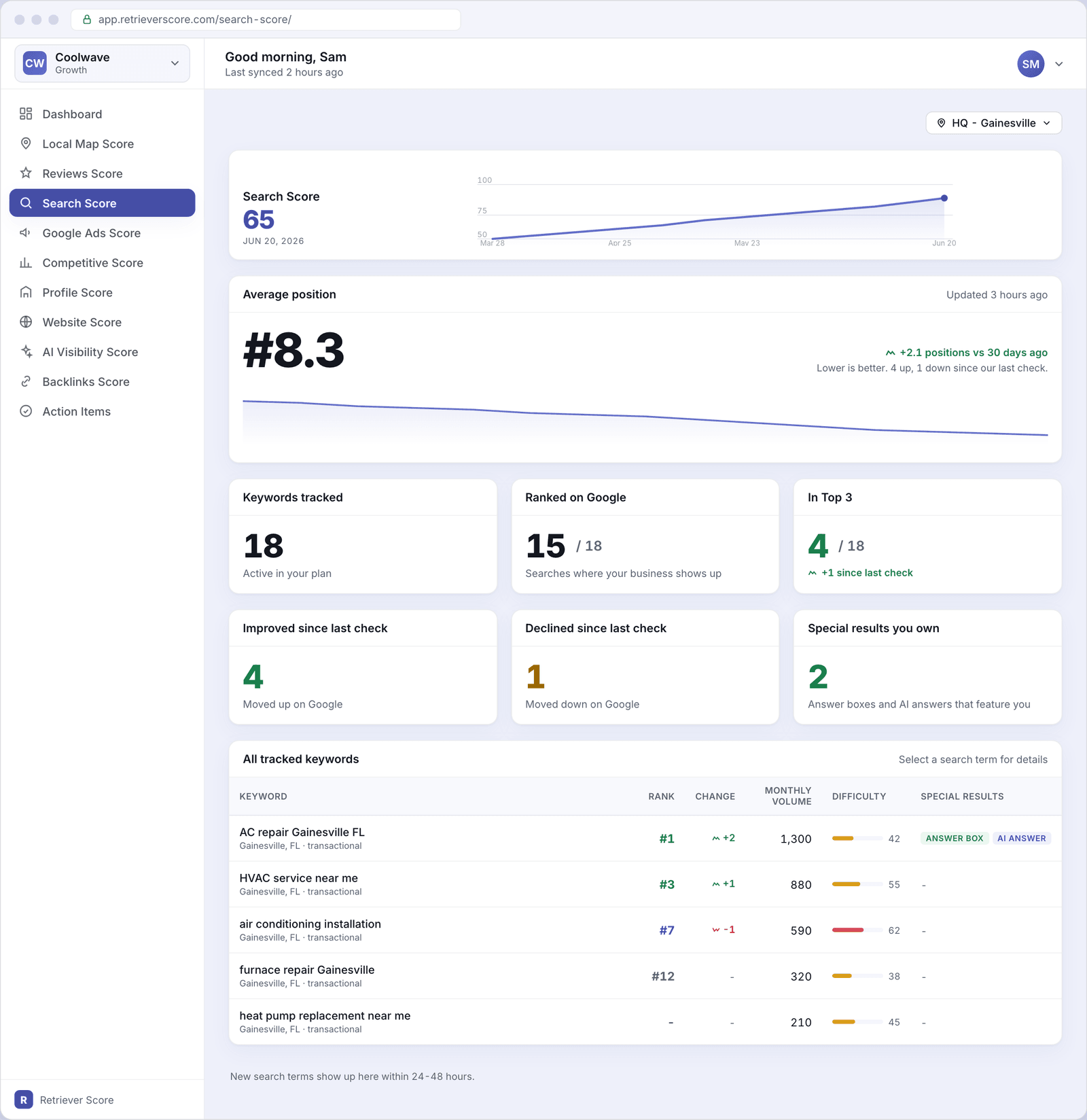
The screen has four sections. Here is what each one tells you.
Score timeline
The large number at the top is your Search Score - a 0-to-100 grade for how visible your website is in Google's regular search results across all your tracked search terms. The line chart shows how the score has moved over the past 12 weeks.
The color follows the same traffic-light system used throughout Retriever Score: green (80-100) is strong, blue (60-79) is good, gold (40-59) is fair, and red (below 40) needs attention.
Average position
Your average rank across all tracked keywords that currently have a result. A smaller number is better - "#1" means your site appears at the very top of Google's results for that search. A delta chip shows whether your average improved or slipped compared to 30 days ago, along with a count of how many keywords moved up versus down since the last check.
A small trend chart below the headline number shows how your average position has moved over the past 30 days. A line trending down (toward lower position numbers) is good - it means you are climbing up the results.
Keywords tracked
The total number of search phrases we monitor for your business. We choose these based on what customers in your area search for, weighted by how often those searches happen. New terms typically appear within 24-48 hours of being added to your account.
Ranked on Google
How many of your tracked keywords currently have a ranking for your website at all. If you track 18 keywords and rank for 15 of them, 3 are invisible to you in Google's regular results for those phrases. The unranked terms are usually the fastest opportunity - getting from zero to any position at all is a meaningful win.
In Top 3
The number of your tracked keywords where your website appears at position 1, 2, or 3 in Google's results. The Top 3 results on a search page get the vast majority of clicks - appearing there for even a few high-volume terms can meaningfully increase the traffic your website receives.
A trend chip shows whether this count went up or down since the last check.
Improved since last check
The number of keywords where your rank went up (a lower position number) compared to the previous weekly check. A rising count here means your content and reputation improvements are paying off.
Declined since last check
The number of keywords where your rank went down compared to the previous check. A small number of declines is normal week to week - Google's results shift constantly. A larger or growing decline count may mean a competitor improved their site or that Google updated its algorithm.
Special results you own
The total count of "answer box" and "AI answer" results that feature your business. See the next section for what these mean.
All tracked keywords (the table)
A row for every search term we track. Each row shows:
- Keyword - the search phrase, plus the location it is measured for and the type of intent (transactional means people are ready to hire someone; informational means they are researching).
- Rank - your current position in Google's results. "#1" is best. A dash means your site is not appearing for that phrase yet.
- Change - whether your rank improved (green arrow up) or declined (red arrow down) since the last check.
- Monthly volume - roughly how many people in your area search for that phrase each month. Higher-volume terms are worth more effort, but they are also usually harder to rank for.
- Difficulty - a 0-100 score for how competitive this search term is. A lower number means it is easier to rank for. The colored bar makes it easy to spot the easiest opportunities at a glance.
- Special results - badges that appear when your content earned a prominent spot beyond the regular ranking. See below for what each badge means.
What the special result badges mean
Two badges can appear in the keyword table. Both are significant wins because they put your business in front of searchers even more prominently than a regular ranking.
- Answer box - Google chose a passage from your website to display at the very top of the results page as a direct answer to the searcher's question. This box appears above all the regular results, which means searchers see your business name and content before anyone else's. It is sometimes called a "featured snippet."
- AI answer - Google's AI Overview (the AI-generated summary at the top of some searches) includes a citation from your website. When your site is cited in an AI answer, your business appears alongside the summary with a link.
The location switcher
If your business has more than one location, a switcher appears in the top-right corner. Each location has its own set of tracked keywords tailored to that area, so the rankings for your Gainesville location may look different from those for your Newberry location. Selecting "All Locations" shows a combined view across your whole footprint.
Start with the keywords where you're already close. A keyword ranked at position 8 or 12 is already on Google's first page. A modest improvement in your Profile Score or a few new reviews can sometimes be enough to push you into the Top 3 for those terms - which typically doubles or triples the number of clicks your site gets from that phrase.
What to watch over time
- Average position trending lower - that is good. A number moving from 12 to 8 means you are climbing up the results across all your terms.
- A keyword moving from "not ranked" to any position - your site has become visible for that phrase. Keep improving your content and profile to push it higher.
- Special result badges appearing - an answer box or AI answer citation is a meaningful win. It means Google trusts your content enough to feature it above regular results.
- Declined count rising week over week - a competitor may be actively improving their site. Check your Alerts and action items for recommended next steps.