
Profile Score
Your Google Business Profile is often the very first thing a potential customer sees. This score measures how complete, accurate, and active that listing is.
In your app: /profile-score/
When someone searches for a service you offer, your Google Business Profile can appear right at the top of the results - with your name, rating, photos, hours, and a click-to-call button. But Google ranks profiles that are complete and well-maintained much higher than ones with gaps. The Profile Score tells you exactly how well your listing is set up and shows you the specific things you can do to make it better.
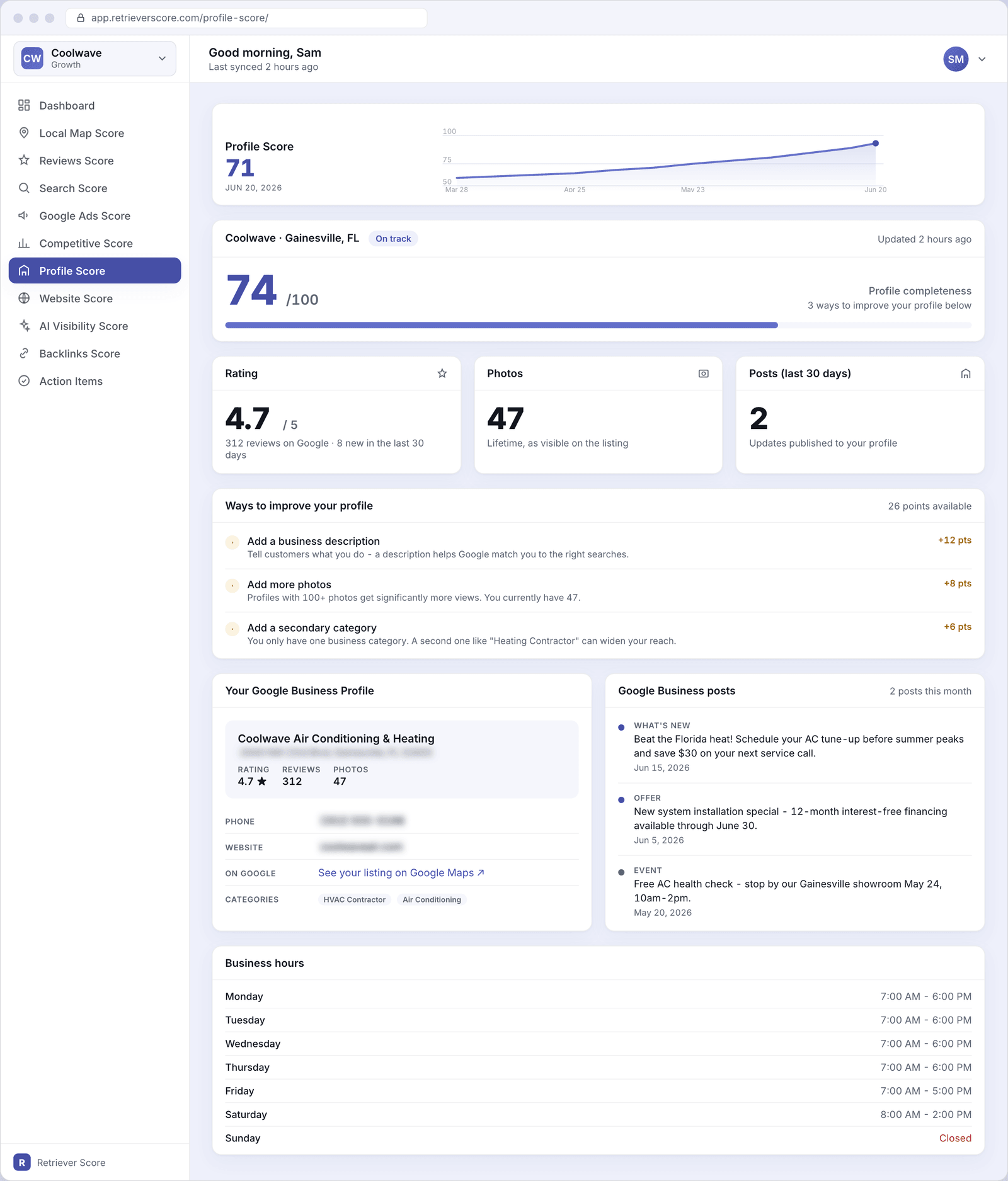
What's on this screen
The screen has several sections. Here's what each one tells you.
Score timeline
The large number at the top is your Profile Score - a 0-to-100 grade for how well your Google Business Profile is set up. The line chart shows how it has moved over the past 12 weeks. The color follows the same system used everywhere in Retriever Score: green (80-100) is strong, blue (60-79) is good, gold (40-59) is fair, and red (below 40) needs attention.
Profile completeness card
Just below the timeline, this card shows two numbers. The large one on the left is a completeness score (out of 100) that grades how fully your profile is filled out. The text on the right tells you how many things you can still improve - and how many points each one is worth. The colored bar under the numbers shows your progress at a glance. The badge next to your business name (for example, "On track" or "Needs attention") is a quick summary of where you stand.
Rating tile
Your current Google star rating and the total number of reviews on your listing. A number below that shows how many new reviews arrived in the last 30 days, so you can see at a glance whether your review pace is picking up or slowing down. Your rating feeds directly into where Google shows you in search results - a higher average with more reviews signals trust.
Photos tile
The number of photos currently visible on your Google listing. Google's own data shows that profiles with more photos get more views and calls. If this number is low (under 50 or so), adding fresh, real photos of your work, team, and location is one of the fastest ways to move your Profile Score up.
Posts tile
How many Google Business posts you published in the last 30 days. Posting regularly - updates, offers, or events - keeps your profile active and signals to Google that your business is current. Aim for at least two posts a month. You can see recent posts and manage them from the Google Business posts screen.
Ways to improve your profile
This is the most actionable card on the screen. It lists the specific gaps in your Google Business Profile - things like a missing business description, too few photos, or only one category - and shows exactly how many points fixing each one would add to your score. Work through the highest-point items first for the biggest gains. Each improvement is something you can do yourself on your Google Business Profile.
Your Google Business Profile listing
A summary of what Google currently shows on your listing: your business name, address, star rating, review count, photo count, categories, and links. The phone number and website are intentionally blurred here to protect your information - they are read directly from Google and are always up to date. If any of these details look wrong, you can fix them on your Google Business Profile and the change will appear here on the next scan.
The "See your listing on Google Maps" link opens your live listing so you can check exactly what customers see when they find you.
Google Business posts
A list of your recent posts on Google - the short updates, offers, or event notices that appear on your listing. Each post shows its type (What's New, Offer, Event), the text, and when it was published. Posting consistently keeps your profile looking active and gives customers a reason to choose you over a competitor with a quieter listing. Head to the Google Business posts page to see the full history and performance for each post.
Business hours
The hours currently listed on your Google Business Profile for each day of the week. If these don't match your real schedule, customers who call during a "closed" window may hang up - and Google may rank you lower for searches that happen when your listing says you're closed. Keep these up to date, and add special hours for holidays.
Why your Google Business Profile matters
Your Google listing is often the first contact a new customer has with your business - before they ever visit your website. A well-filled profile shows up higher in Google's map results, earns more clicks, and builds instant trust with anyone who finds you. Incomplete profiles get pushed down or skipped over in favor of competitors who have taken a few minutes to fill everything out.
Start with the highest-point items in the checklist. The "Ways to improve" card shows you exactly what each fix is worth. A missing business description is often worth 10-12 points by itself - it takes about five minutes to write one in your Google Business Profile, and the payoff to your score (and your search ranking) is immediate.
What to watch over time
- Your completeness score rising - each item you check off adds points and strengthens your position in Google's results.
- Your photo count growing - set a reminder to upload a few new photos every month. Real photos of your work do better than stock images.
- Your posts staying active - if the "Posts" tile drops to 0, Google may treat your profile as less active. Two posts a month is a solid pace.
- Your rating holding steady or improving - check your Reviews Score to see recent reviews and your response rate. Responding to reviews (especially negative ones) helps your rating and your visibility.
Changes you make on Google Business Profile usually show up in Retriever Score within a day or two - that is when we run our next scan. If you just made a big update and want to see it reflected quickly, the score refreshes on its normal daily cycle.