
Reviews Score
Your Reviews Score measures the health of your online reputation - your rating, how many reviews you have, how often you respond, and whether the trend is moving in the right direction.
In your app: /reviews-score/
Online reviews are often the first thing a potential customer reads before calling your business. The Reviews Score gives you a single number that reflects the overall health of your reputation - your average star rating, how many reviews you have collected, how quickly they are coming in, and how often you are responding. Use this screen to track progress over time and spot any problems before they hurt your business.
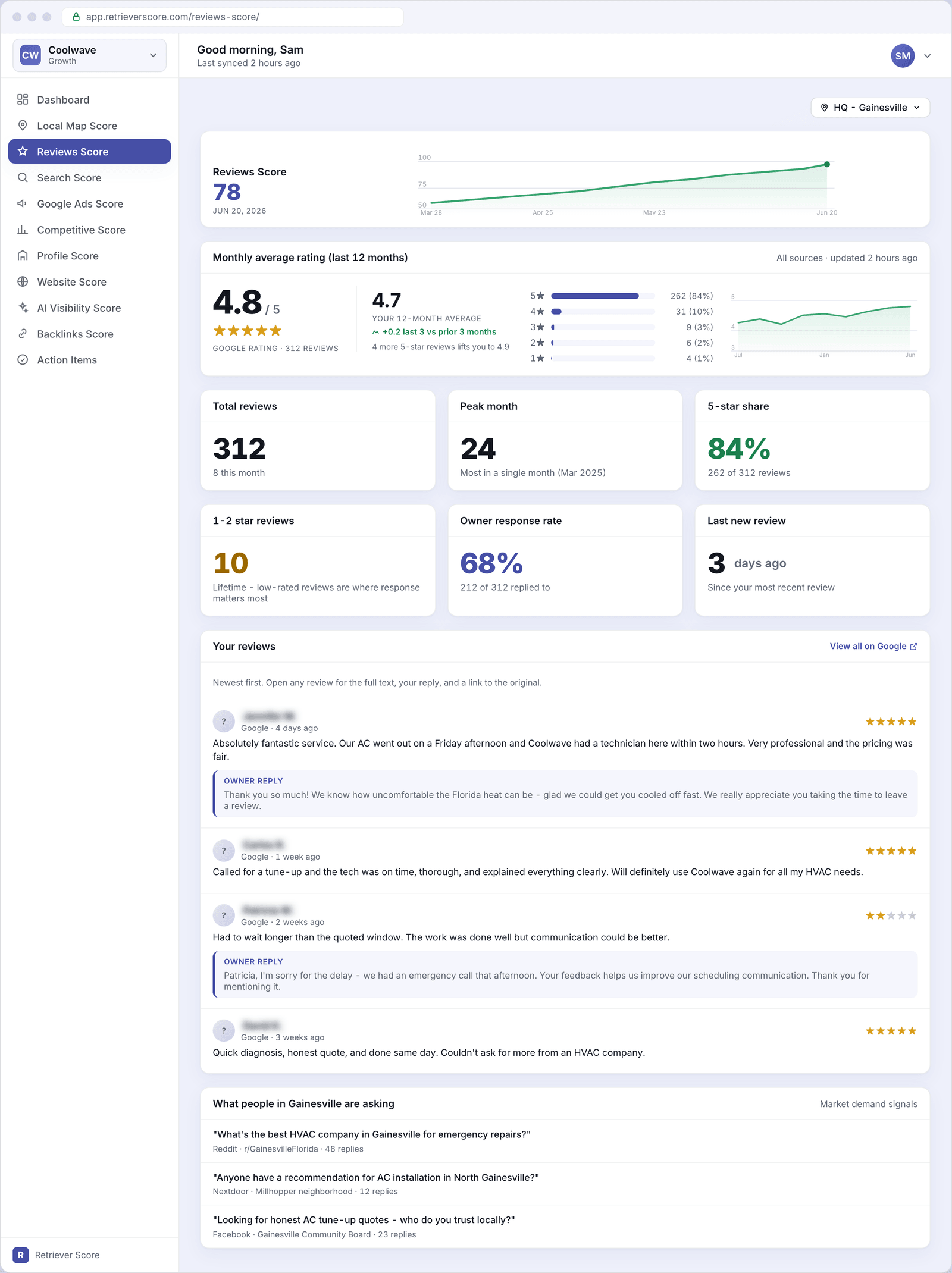
What's on this screen
The screen is organized into five sections. Here is what each one tells you.
Score timeline
The large number at the top is your Reviews Score - a 0-to-100 grade for the overall health of your review presence. The line chart beside it shows how the score has moved over the past 12 weeks. A rising line means your reputation is strengthening; a flat or falling line is a signal to act.
The score color follows the same traffic-light system used everywhere in Retriever Score: green (80-100) is strong, blue (60-79) is good, gold (40-59) is fair, and red (below 40) needs attention.
Monthly average rating
This card shows two ratings side by side:
- Google rating - the star rating Google currently displays on your business listing, along with your total review count on Google. This is the number most customers see before they decide to call.
- Your 12-month average - the average rating across the reviews we have collected over the past year. This can differ slightly from Google's number because it reflects a specific time window. A trend chip shows whether this average is rising or falling compared to the prior three months.
Below the hero numbers you will see a star distribution bar - how many of your reviews are 5-star, 4-star, and so on - and a rating trend chart showing how your monthly average has moved over the past 12 months.
A small note under the 12-month average tells you how many additional 5-star reviews would push your rating to the next decimal point (for example, "4 more 5-star reviews lifts you to 4.9"). This is a concrete goal you can act on.
Total reviews
The total number of reviews your business has collected across all sources (Google, Yelp, and others if connected). Below the headline count is how many reviews arrived this month - a quick way to see whether momentum is building.
Peak month
The highest number of reviews you received in any single month, and which month that was. This gives you a benchmark to aim for and shows whether your best review months were seasonal or tied to a specific campaign.
5-star share
The percentage of your reviews that are 5-star, and the raw count. A high 5-star share (above 80%) is a strong signal that most customers are delighted. If this number is low, look at the star distribution on the rating card to understand where the gaps are.
1-2 star reviews
The lifetime count of 1-star and 2-star reviews. A small number here is normal for any business that has been around a while - what matters most is whether you responded to them. Responding to low-rated reviews shows future customers that you take feedback seriously, and it often softens the impact of a bad review.
Owner response rate
The percentage of all your reviews that received a reply from you. Google rewards businesses that engage with their reviewers - a higher response rate is a positive signal for your ranking and for prospective customers reading your listing. Aim for at least 80%. Even a short, genuine reply counts.
Last new review
How many days have passed since your most recent review arrived. A long gap (more than 30 days) can signal that your review request process has stalled. Regularly asking happy customers to leave a review is one of the most effective ways to improve your Reviews Score.
Your reviews
A list of your most recent reviews, newest first. Each row shows the reviewer's name (blurred for privacy in this help guide), star rating, review text, and when it was posted. If you replied to the review, your reply appears below it.
A "View all on Google" link at the top right opens your full Google listing reviews page in a new tab, so you can reply directly from there.
Customer names are shown in the app only to you - they are never shared with anyone else and are blurred in this help guide so you can share screenshots without exposing private information.
What people in your area are asking
This card shows real questions and discussion threads from local community platforms (Reddit, Nextdoor, Facebook groups) where people are asking for recommendations in your trade. It is read-only market intelligence - we pull it automatically so you can see what potential customers are talking about, even if your name does not come up yet.
This is not something you can reply to from inside Retriever Score. Think of it as a window into your local market's demand - a way to understand what people are searching for and what objections they have.
The location switcher
If your business has more than one location, a switcher appears in the top-right corner of the screen. Choosing a different location or "All Locations" re-scopes all the cards on this page to that selection. Each location tracks its own reviews independently, so you can see how your Gainesville location compares to your Newberry location, for example.
Why reviews matter so much
Google uses your star rating, review count, and recency as ranking signals for both your map pack position (see Local Map Score) and your regular search results. A business with 200 reviews and a 4.8 average almost always outranks a competitor with 20 reviews and a 4.3 average, all else being equal.
Beyond ranking, reviews are the first thing most customers read before calling. A high rating with recent, well-responded reviews builds trust in seconds. That trust translates directly into more calls, more estimates, and more jobs.
The fastest way to raise this score is to ask. Most happy customers never think to leave a review unless someone asks them. Send a short, friendly text or email after every completed job with a direct link to your Google review page. Even getting two or three extra reviews a month compounds quickly over a year.
What to watch over time
- Rising review count with a stable or improving rating - you are building momentum. Keep asking for reviews.
- A sudden drop in your monthly average - check for a cluster of low-rated reviews and respond to each one individually. A thoughtful reply to a 1-star review often does more for your reputation than five 5-star reviews.
- Owner response rate below 60% - set aside 10 minutes each week to reply to any new reviews. The Alerts and action items screen will flag unanswered reviews if the gap gets wide.
- More than 30 days since your last review - your review request process may have stalled. Re-activate it.