
Google Business Posts
A running archive of every post you have published to your Google Business Profile, so you can see what's out there and how it looks to searchers.
In your app: /gbp-posts/
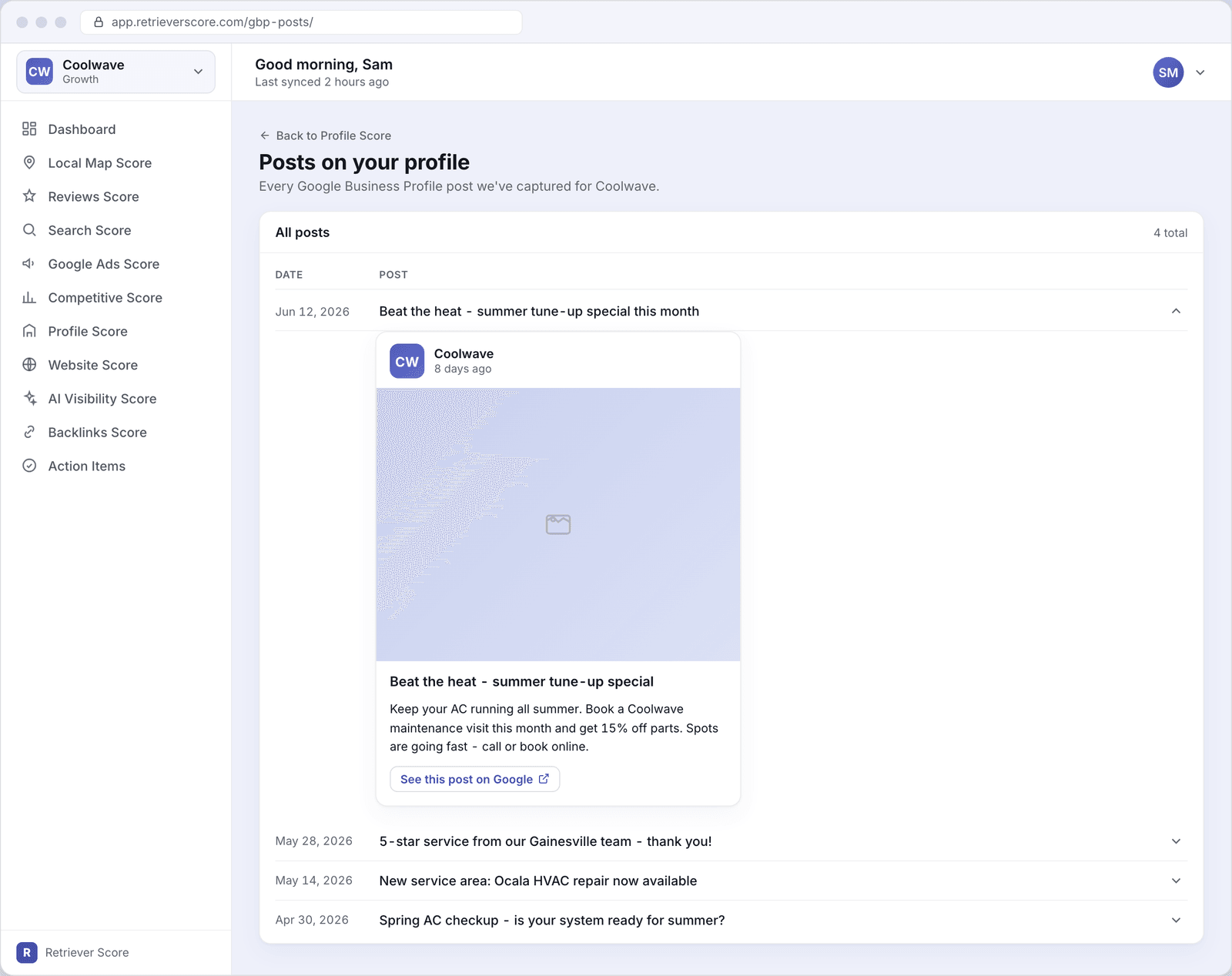
Google lets any business post short updates directly to its listing on Google Search and Google Maps - the same panel where your hours, photos, and reviews appear. These are called Google Business posts (or GBP posts). This screen shows every post Retriever Score has captured for your business, newest first. You can expand any row to see the full post exactly as Google displays it to someone who finds you in search.
You reach this screen from the Profile Score page via the “Back to Profile Score” link - it is a detail view for that score, not a separate section.
What's on this screen
The screen has a single card - All posts - that lists every post we have captured, in reverse chronological order (newest at the top). Each row shows the date the post was published and a one-line headline. Click any row to expand it and see the full post.
Posts list
The two columns are Date (when the post was published to Google) and Post (the title if the post has one, otherwise the first line of the body text). The count in the top-right corner shows how many posts are on file in total. Retriever Score picks up new posts automatically, usually within a day of them going live on Google.
Expanded post card
Click a row's chevron to expand it. The post unfolds into a card styled to match how Google shows your post to a searcher - your business name and avatar at the top, the post photo (if there is one), the full text, and a “See this post on Google” link that opens the live post. This lets you confirm what customers actually see without leaving Retriever Score.
What Google Business posts are
A Google Business post is a short update that appears on your Google listing - the box that shows on the right side of Google Search results or inside Google Maps when someone looks up your business. Posts can be text updates, offers, event announcements, or product highlights. They typically stay visible for seven days (offers can run longer), but Google keeps a history of them on your profile that searchers can scroll through.
Why posting regularly helps
Frequent posting signals to Google that your business is active and engaged, which is a factor in how prominently your listing shows. Posts also give searchers a reason to choose you - a current seasonal offer or a recent five-star shout-out can tip the decision in your favor right at the moment they are looking. A business with fresh posts looks more trustworthy than one whose listing has been quiet for months.
Aim for at least one post per week. It does not need to be long - a seasonal tip, a before-and-after photo from a recent job, or a quick reminder about your service guarantee takes five minutes to write and can keep your listing looking active and worth clicking.
How to publish a new post
Retriever Score shows you what has been posted - it does not publish posts on your behalf. To add a new post, go to your Google Business Profile account directly (search for your business name on Google while signed in, then use the “Add update” option that appears in your listing). New posts will appear in this screen within about a day once Google picks them up.
What to look for
- Gaps in the date column. If the newest post is more than a week old, it is worth adding a fresh one. Searchers - and Google - notice when a listing goes quiet.
- Text that got cut off. Google truncates long posts in the search results panel. Use the expanded card view to confirm your key message comes through in the first line or two.
- Missing posts. If you published a post and do not see it here within two days, check that your Google Business Profile is verified and the post was approved by Google (Google can remove posts that violate its policies).