
Local Map Score
Google shows a "map pack" of three local businesses at the top of many searches. This score measures how often you make that list - and how your reach is growing.
In your app: /local-map-score/
When someone nearby searches for a service you offer, Google often shows a map with three businesses pinned at the top of the results. That three-slot list is called the map pack, and it drives more calls and clicks than almost anything else a local business can do online. The Local Map Score tells you exactly how well you're showing up in those results - across every neighborhood in your service area, for every search that matters to you.
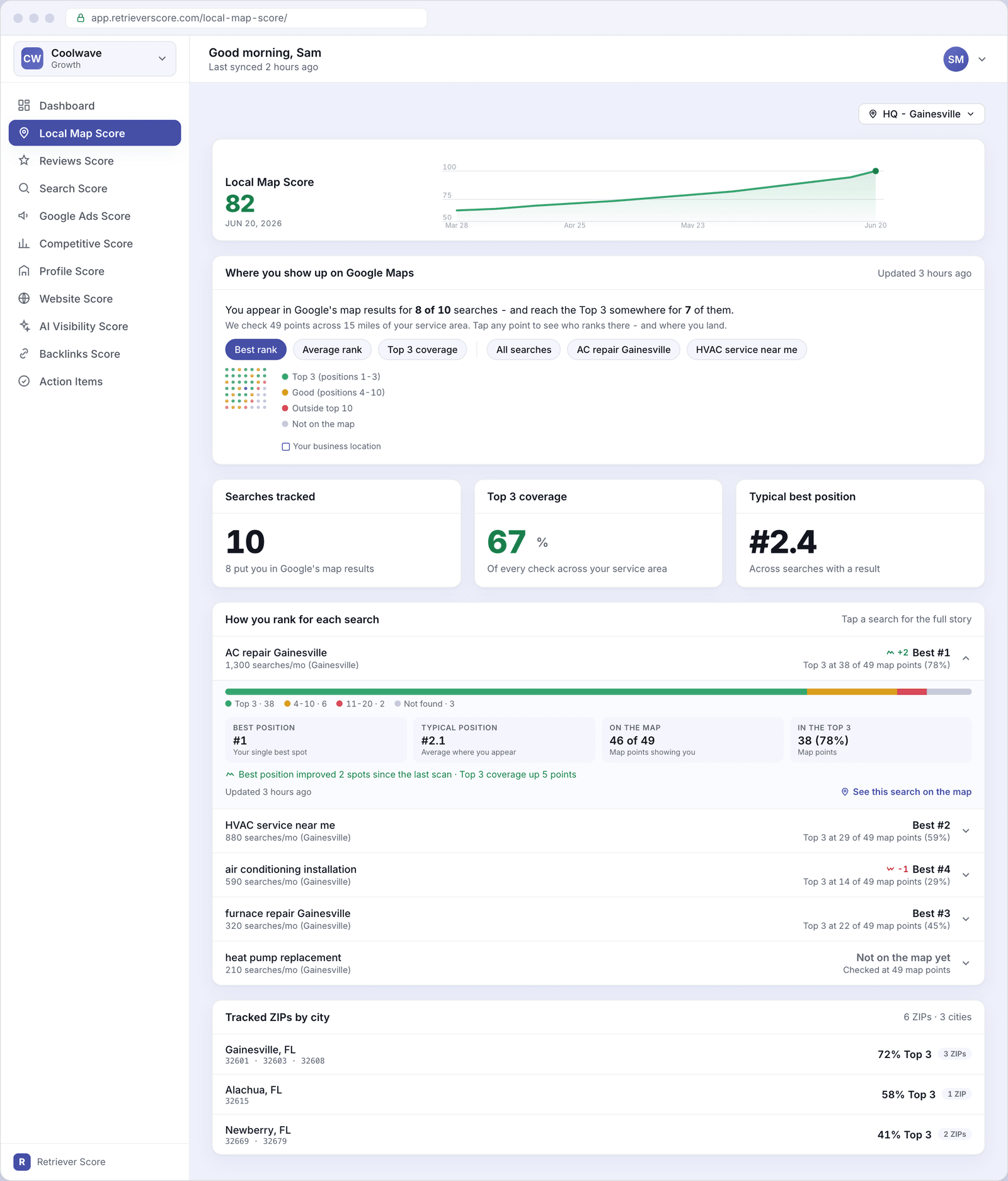
What's on this screen
The screen has five sections. Here's what each one is telling you.
Score timeline
The large number at the top is your Local Map Score - a 0-to-100 grade for how well you rank in Google's map results across your whole service area. The line chart beside it shows how the score has moved over the past 12 weeks. A rising line means your map presence is growing; a flat or falling line is a signal to act. The color of the number follows the same traffic-light system used everywhere in Retriever Score: green (80-100) is strong, blue (60-79) is good, gold (40-59) is fair, and red (below 40) needs attention.
Where you show up on Google Maps
The heatmap is the heart of this screen. Each colored dot represents a real point we checked inside your service area - we scan dozens of locations spread across your coverage zone to see where you appear in Google's map results at each spot.
The colors show your best map position at that point: green means you ranked in the Top 3 (the map pack), amber means you ranked 4-10, and red means you were outside the top 10. Gray means you didn't appear at all. The dot with a border marks your business location.
Use the filter chips above the map to narrow the view to a single search term, or to switch from your best rank to your average rank or Top 3 coverage. Tap any dot to see who ranked there - and exactly where you placed.
Searches tracked
A count of the search phrases we monitor for your business - things like "AC repair Gainesville" or "HVAC service near me." Below that count is how many of those searches put you anywhere in Google's map results. If a search shows zero, you're invisible for that phrase and it's worth acting on.
Top 3 coverage
This percentage tells you how often you landed in the Top 3 across all the map checks we ran - combining every search term and every point in your service area. A higher percentage means more potential customers are seeing your business right at the top of their search. Think of this as your "reach" number: 70% means roughly seven out of every ten checks showed you in the map pack.
Typical best position
Your average best rank across all searches that returned a result for you. A lower number is better - "#1.8" means that when you appear, you're usually near the very top of the map pack. If this number is creeping up over time, it means competitors are nudging you down in parts of your service area.
How you rank for each search
A row for every search term we track. Each row shows the search phrase, its monthly search volume (how many people look for that phrase near you each month), your best map position for that search, and how many of the map points you reached the Top 3. A trend chip - a small up or down arrow - shows whether your best position improved or slipped since the previous scan.
Tap any row to expand it and see the full detail:
- A coverage bar split into four colors (Top 3 / positions 4-10 / positions 11-20 / not found), so you can see at a glance how evenly your coverage is spread.
- Best position - your single strongest result across all map points for this search.
- Typical position - your average rank at the points where you do appear.
- On the map - how many of the checked points showed your business at all.
- In the Top 3 - how many of those points put you in the map pack.
- A plain-English trend sentence saying whether you improved or slipped since the last scan.
- A "See this search on the map" link that switches the heatmap above to show only this search term, so you can see exactly which neighborhoods you're winning and where you still have gaps.
Tracked ZIPs by city
A breakdown of your service area by city and ZIP code, with a Top 3 percentage for each city. This tells you whether your map coverage is consistent across your whole territory or concentrated in one area. If a city near the edge of your service area shows a low percentage, that's a neighborhood where a stronger local presence could win you more business.
The location switcher
If your business has more than one location, a switcher appears in the top-right corner of the screen. Choosing a different location re-scopes the entire page - the heatmap, coverage tiles, keyword list, and ZIP breakdown all update to show data for that location. Each location gets its own independent Local Map Score.
Why the map pack matters
Studies consistently show that the three businesses in the map pack get the majority of clicks and calls from local searches - often more than the regular website results below them. For service businesses like HVAC, plumbing, landscaping, or dental, a searcher who needs help today is almost always going to call one of the businesses they see on that map. Appearing there consistently, across your whole service area, is one of the highest-impact things you can do for your business.
Start with the searches where you're close. If a term shows "Best #4" or "Best #5," you're just outside the map pack for that phrase. A small push - like earning a few more reviews or adding a Google Business post - can sometimes be enough to cross into the Top 3. Those near-miss terms are usually your fastest wins.
What to watch over time
Check the score timeline once a week. The most important signals are:
- Rising Top 3 coverage - more neighborhoods are seeing you in the map pack. Keep doing what's working.
- A search moving from "Not on the map" to any rank - that's your presence expanding into a new phrase. Good sign.
- A drop in your typical best position - a competitor may have improved their profile or reviews. Check your Reviews Score and Profile Score for quick wins that help Google rank you higher.
- Gray patches in the heatmap growing - parts of your service area are getting harder to reach. The Alerts & action items screen will usually flag this with a suggested fix.