
Backlinks Score
Your Backlinks Score measures how many other websites are vouching for yours by linking to it - and whether those links are the kind Google trusts.
In your app: /backlinks-score/
A backlink is simply a link from another website to yours. Think of it like a referral - when a trusted local news site, a business directory, or an industry association links to your website, they are telling Google "this business is real and worth knowing about." The more high-quality sites that link to you, the more Google trusts your site, and the higher it tends to rank in search results.
The Backlinks Score measures the quantity, quality, and diversity of the sites linking to you, and whether that number is growing month over month. Unlike the other scores, this one tracks your whole domain - not individual locations - because your website is a single presence on the internet regardless of how many offices you have.
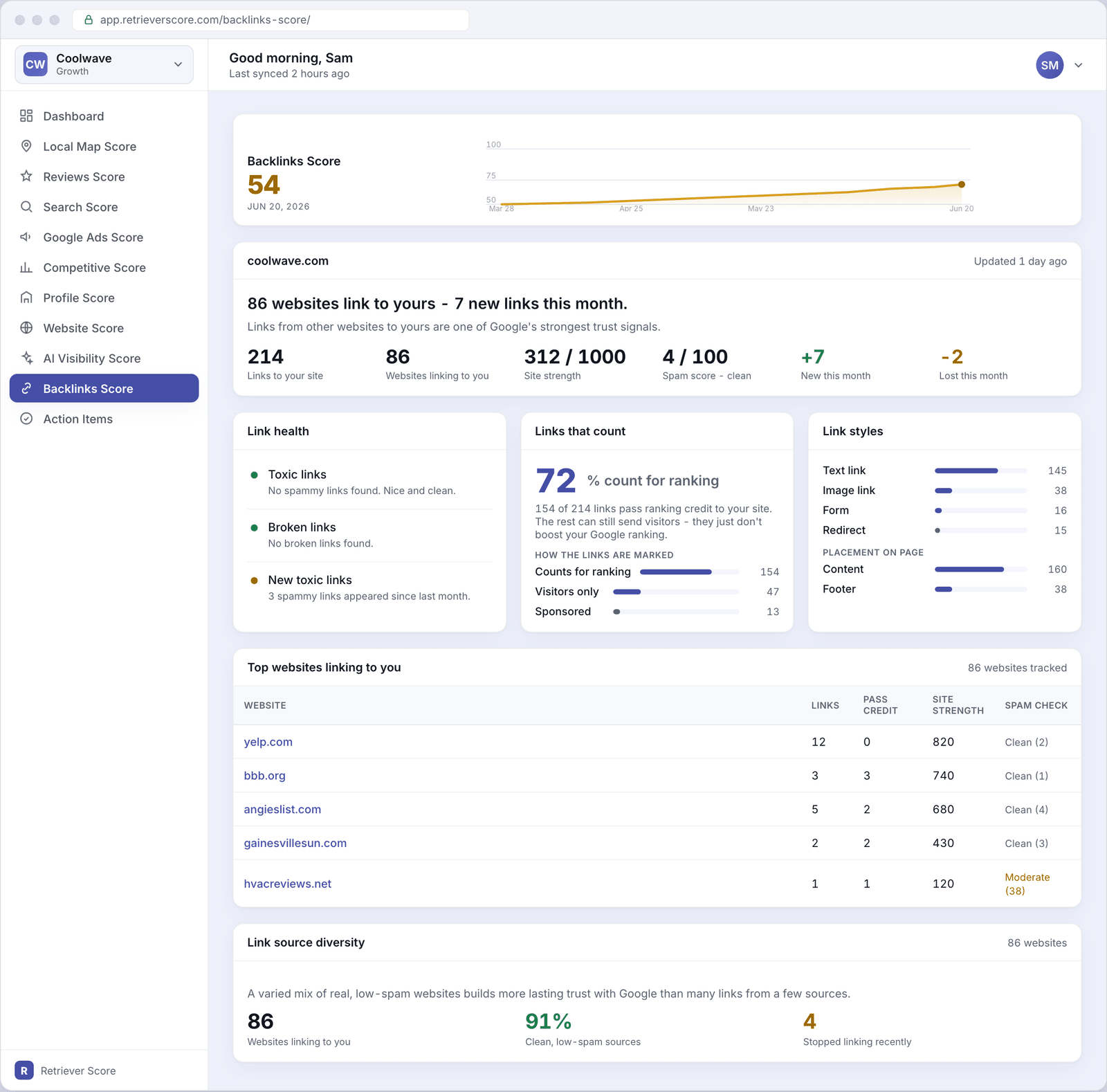
What's on this screen
The screen is organized into five sections. Here is what each one tells you.
Score timeline
The large number at the top is your Backlinks Score - a 0-to-100 grade for the overall strength and health of the links pointing at your website. The line chart beside it shows how the score has trended over the past 12 weeks.
The color follows the same system used throughout Retriever Score: green (80-100) is strong, blue (60-79) is good, gold (40-59) is fair, and red (below 40) needs attention. Backlinks scores tend to move slowly - building a healthy link profile is a gradual process, not something that changes overnight.
Summary hero card
This card opens with a plain-English headline - for example, "86 websites link to yours - 7 new links this month." Below that is a row of six metrics:
- Links to your site - the total number of individual links pointing at any page on your website.
- Websites linking to you - the number of distinct domains. This is usually the more important number - 86 different websites each linking once is stronger than one website linking 86 times.
- Site strength - an authority score (out of 1,000) that reflects how trusted and well-linked your overall domain is in Google's eyes. A higher number means more trust.
- Spam score - how spammy your own site looks to link-analysis tools, on a 0-100 scale. You want this low (under 30). A clean, legitimate business website typically scores under 10.
- New this month - how many new links were first seen in the current monthly check. A positive trend here means your link profile is actively growing.
- Lost this month - how many links were present last month but not found this month. Some churn is normal (websites get redesigned, pages get deleted). A large lost count is worth investigating.
Link health
This card checks three specific health signals and shows a colored dot for each: green means no issue, yellow means a small issue worth watching, and red means something that needs attention.
- Toxic links - links from websites that look spammy or manipulative. A handful of these is common for any business that has been online for a few years; a large number can hurt your Google ranking.
- Broken links - links from other sites that point at a page on your website that no longer exists. Visitors following those links hit a dead end. Fixing them (usually by setting up a redirect from the old URL to a working page) recovers the link's value.
- New toxic links - spammy links that appeared for the first time since last month's check. A sudden spike here is a red flag worth investigating.
Links that count
Not all links send ranking credit to your website. This card shows what percentage of your links are marked to pass ranking credit (sometimes called "follow" links) versus links that can still send visitors but do not help your Google ranking directly.
A breakdown below the headline shows how your links are marked across a few categories: counts-for-ranking, visitors-only, and sponsored. For most local businesses, having 70-80% of links in the counts-for-ranking category is healthy.
Link styles
A breakdown of what type of link each one is - a text link (the most common), an image link, a form, or a redirect. It also shows where on the linking page your link appears: in the main content (most valuable), in the footer, or in navigation. Links placed in the body content of a real article or resource page carry more weight than links tucked into a footer or directory listing.
Top websites linking to you
A table of the most authoritative websites that link to yours, sorted by site strength. Each row shows:
- Website - the domain name, with a link to visit it.
- Links - how many individual links that website sends to you.
- Pass credit - how many of those links send ranking credit.
- Site strength - the authority score of the linking website. A link from a high-strength site (like a major news outlet or a well-known directory) is worth more than a link from a low-strength site.
- Spam check - whether the linking site looks clean, moderate, or spammy.
Link source diversity
A summary of how varied your link sources are. Three numbers tell the story: how many websites link to you in total, what percentage of them are clean and low-spam, and how many stopped linking since the last check.
Google values diversity - getting links from a wide mix of real, relevant websites is better than getting many links from just one or two places. A varied link profile looks natural and trustworthy.
Why backlinks matter for local businesses
Links from other websites have been one of Google's strongest ranking signals for decades, and that is still true today. For a local HVAC company, plumbing business, or dental practice, the best backlinks usually come from:
- Local news sites or community blogs that mention your business
- Industry associations and trade directories (Better Business Bureau, NATE, local chamber of commerce)
- Business listing sites like Yelp, Angi, and similar directories
- Partners or suppliers who link to you from their own sites
- Local sponsorships (charity events, school sports programs, neighborhood organizations)
You do not need hundreds of backlinks to compete locally. A few dozen links from genuinely relevant, trustworthy sites - especially local ones - can have a significant impact on your Search Score and overall visibility.
The easiest backlinks to earn are ones you can ask for. If you are a member of your local chamber of commerce, ask them to link to your website from their member directory. If you support a local charity or sponsor a school event, ask them to add your link to their sponsor page. These are real, local, trustworthy links that directly help your score.
What to watch over time
We check your backlinks monthly - the data updates once a month, not daily, so changes appear gradually.
- Total websites linking to you rising - your link profile is growing. Keep earning links from local and industry sources.
- New toxic links appearing - a yellow or red dot on the link health card means some low-quality sites have started linking to you. In most cases, a few spammy links on their own are not harmful, but a sudden spike is worth watching. The Alerts and action items screen will flag this if it reaches a concerning level.
- Lost links this month greater than new links - your overall link count is shrinking. Check the top referring domains table to see if a major site has dropped your link, and consider reaching out to recover it.
- Spam score rising on your own domain - this can happen if many spammy sites link to you over time. The action items screen will surface this with a suggested fix.